Free · for D&D and any tabletop campaign

Find the night your whole table can make.

dmcal is session scheduling for tabletop campaigns. Players mark when they're free once; the DM sees the nights that work, schedules the session, and everyone answers from the email with one tap.

DMs and players sign in with Google. Players who never sign in can still RSVP from their email.

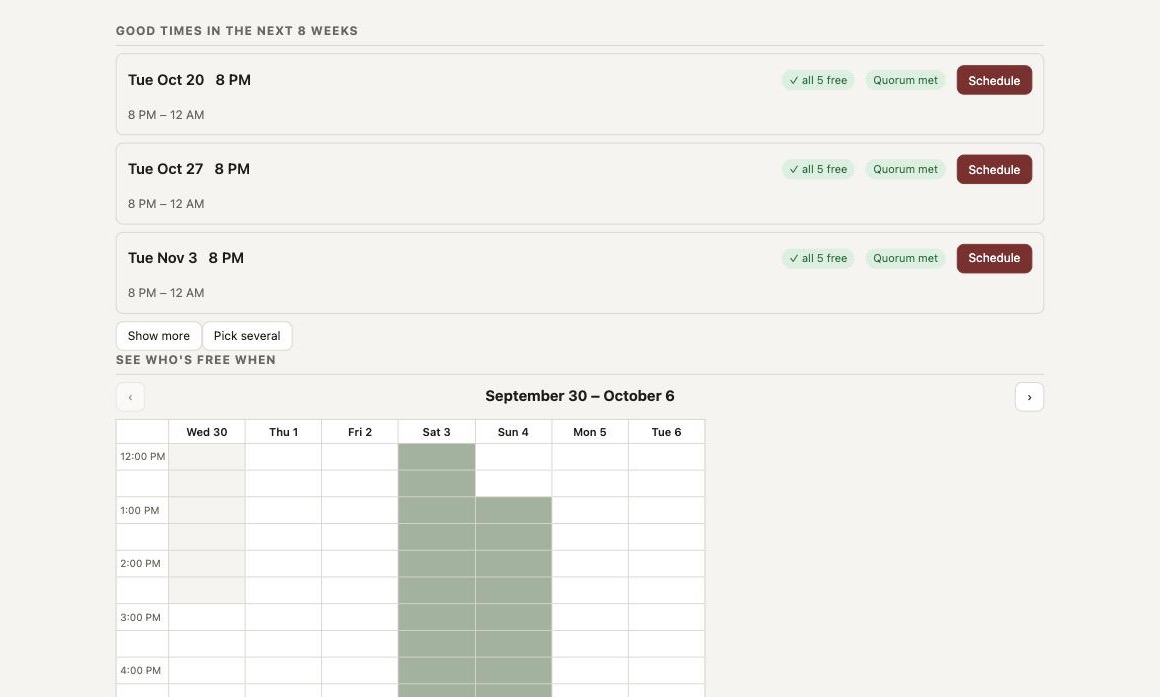
dmcal campaign page showing the availability heatmap and the recommended times

How it works

Three steps, then it runs itself

  1. Everyone marks when they're free

    Weekly hours, every-other-week or "first and third" cadences, and one-off overrides. Players set it once; dmcal expands it across the coming weeks in each player's own time zone.

  2. The DM sees what works

    A heatmap of the whole table's free time, recommended slots ranked by who can make it, and a quorum line so "we play with four" is a rule, not a hope.

  3. Schedule it, and everyone's told

    One session or a whole run of them. Each player gets an email with Going / Maybe / Can't buttons and a calendar invite; the DM hears about every answer; reminders go out the day before with last session's recap.

What's in the notebook

Built for one table that plays together

Availability heatmap

Every 30-minute slot across the look-ahead window, shaded by how many seats are free.

Recommended times

Ranked by who can make it, the campaign's usual start hour, and whether quorum is met.

Quorum

Set the minimum seats you play with; the heatmap, the recommendations and the DM's emails all reflect it.

Schedule a run

Pick up to six dates from one view and send one combined email with per-session RSVP buttons.

One-click RSVP

Going / Maybe / Can't straight from the email, no sign-in, even for players the DM added by hand.

Reminders with a recap

The day before, everyone gets the time, their standing answer, and an excerpt of the DM's notes from last session.

Calendar invites

Every session email carries an .ics invite and an Add-to-Google-Calendar button; moves and cancellations update it.

Managed players

Enter a player's hours yourself until they sign in; when they do, they claim their seat and everything carries over.

Session notes and recaps

Every session keeps the DM's recap and the party's notes in Markdown; the next reminder quotes last time's recap so nobody arrives cold, and a "Previously…" box covers the first dmcal session of an existing campaign.

Shared files

Maps, handouts and PDFs on the campaign or on a single session, stored with the campaign and open to the whole party. Active quests sit alongside them and flow into every session email.

Across campaigns

A player in more than one dmcal campaign never gets double-booked: sessions from the others show as conflicts on the recommendations.

Any cadence

Every week, every other week, or "first and third Tuesdays". Recommendations skip the gap after a scheduled session so the next suggestion lands on the right week.

Who's coming

The session page answers the question the group chat can't

RSVPs and party seats at a glance, quorum status, attendance, notes and docs — and for the DM, per-player delivery status of every email with a resend button for anyone it didn't reach.
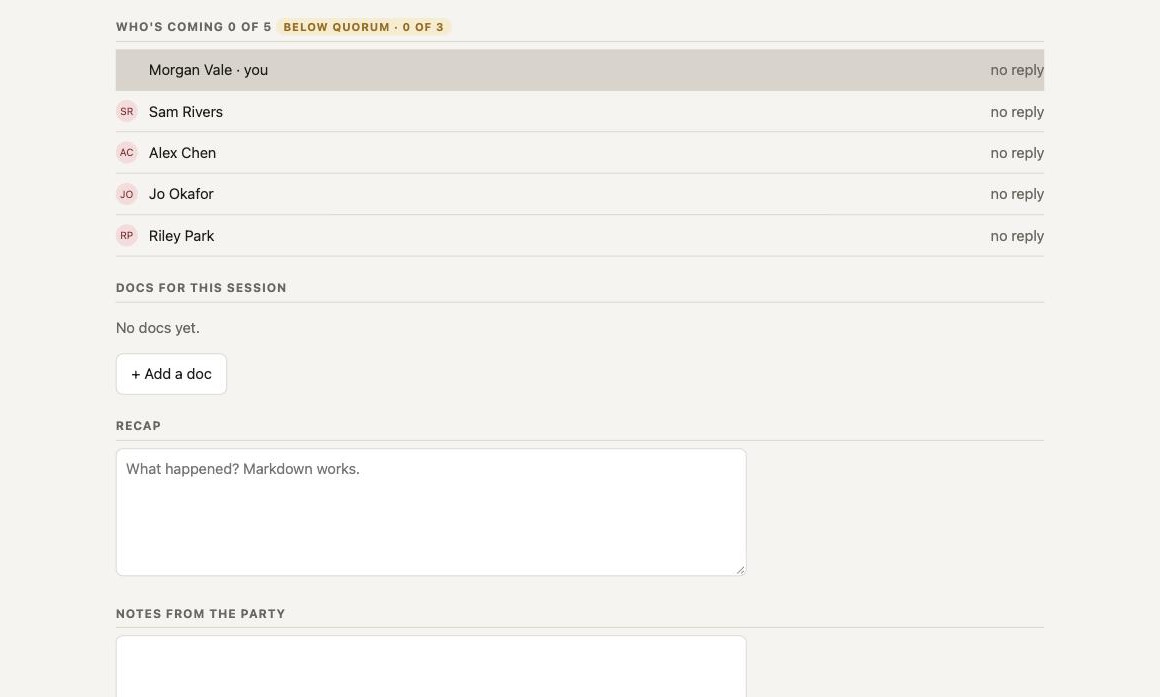
dmcal session page with RSVPs, quorum badge and the DM's notices panel

In the inbox

One email does the whole job

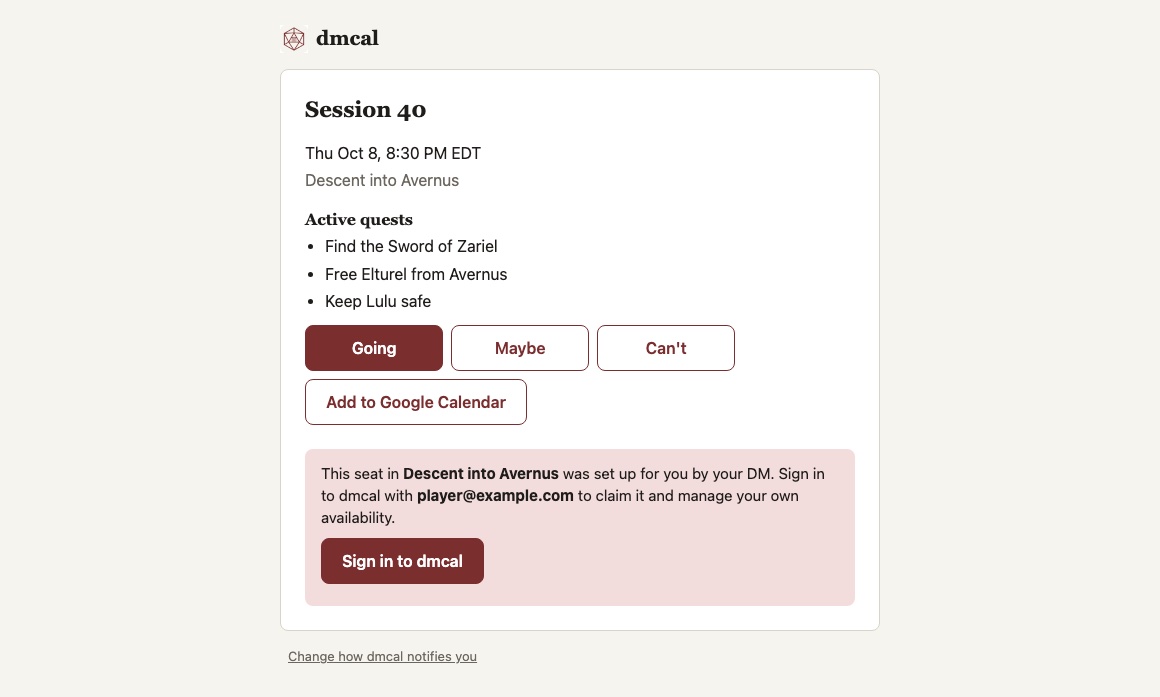
Branded, readable on a phone, with the three answer buttons, the calendar invite, active quests, and a nudge for players who haven't claimed their seat yet.

A dmcal session email with Going, Maybe and Can't buttons

Questions

Frequently asked

Is dmcal free?
Yes. It exists because our own table needed it. There are no plans, tiers or ads.
Do my players need accounts?
DMs and players sign in with Google to mark availability. A DM can also add a player by hand and enter their hours; that player gets the same emails and can RSVP with one tap without ever signing in, then claim their seat later.
What about players in other campaigns?
If a player is in more than one dmcal campaign, sessions from the others show as conflicts on the recommendations, so you never double-book the same person.
Does it send texts?
Email today. Text notifications are built and switched off while we finish carrier verification.
Where does my data live?
Firebase (Google Cloud) in the US. Read the privacy policy and terms linked below; delete a campaign and everything under it goes with it.

Your next session, on a night everyone can make.

Free. Sign in with Google.